Usage in your menu bar.
Choose the Claude Code and Codex limits, labels, bars, and numbers you want to see. Toki keeps them in your Mac menu bar.

Track Claude Code and Codex usage limits and reset times from your Mac menu bar. Open Toki for local token analytics and a clearer picture of your work.
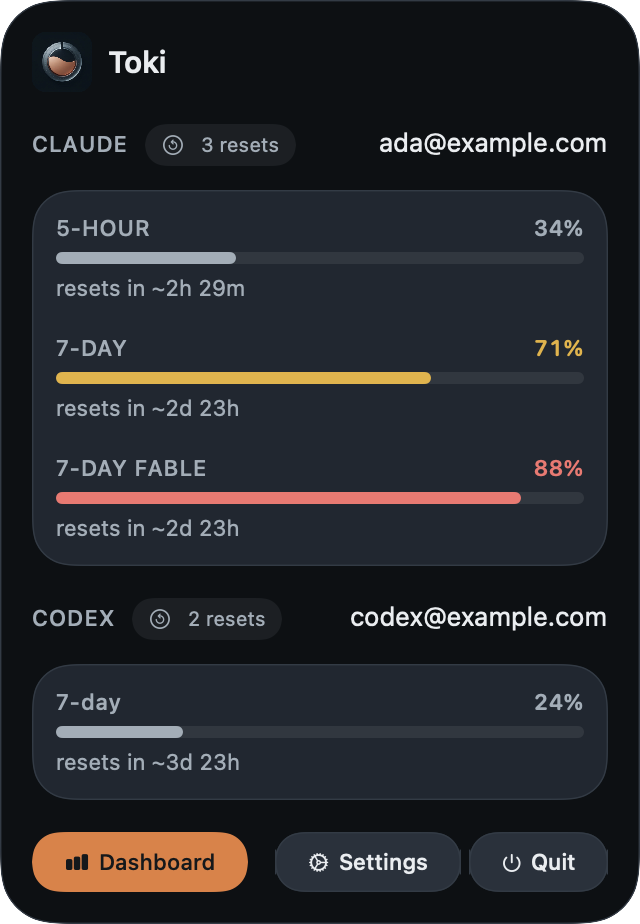
Keep your Claude Code and Codex rate limits in view, with available five-hour and weekly windows and reset countdowns.
Choose the Claude Code and Codex limits, labels, bars, and numbers you want to see. Toki keeps them in your Mac menu bar.
See usage windows and reset countdowns for Claude Code and Codex when the providers report them.
Save and switch accounts for each provider independently, with their limits kept separate.
Explore Claude Code and Codex token usage by model, project, and day. See your activity history and estimated API costs in one dashboard.

Screenshots show demonstration accounts and usage data. Spend is an API-equivalent estimate, not a provider bill.
Built around your workflow
Toki indexes local Claude Code and Codex transcripts for usage history. It asks the providers for live limit data, so your gauges stay current.
Explore the sourceLook back at tokens, projects, models, and daily activity from transcripts stored on your Mac.
See relevant Claude and Codex incidents in the app, with links to the provider's status details.
Choose notifications for limit thresholds, resets, account events, and incidents.
Frequently asked questions
Getting started with your Mac usage tracker.
Toki shows the usage limits and reset countdowns reported for your signed-in Claude Code account. Choose indicators for your menu bar, then click Toki to see available five-hour, weekly, and model-specific windows.
Yes. With the Codex CLI installed and signed in with your ChatGPT account, Toki shows Codex usage limits and reset times alongside Claude Code. Each provider keeps its own limits and saved accounts.
The dashboard breaks down Claude Code and Codex token usage by model, project, and day using local transcripts. Cost estimates use the providers' published API token prices; actual subscription charges follow your provider's plan.
Yes. Toki is free to download, and its source code is available under the Apache License 2.0. Your Claude or ChatGPT subscription is managed separately by its provider.
No. Toki indexes Claude Code and Codex transcripts stored on your Mac for its usage analytics. It contacts the providers for live usage-limit data. Your local conversation history stays on your Mac.
Download the latest release, open the DMG, and move Toki to Applications. Launch it and click its menu-bar icon. Toki requires macOS 14 or later on Apple Silicon, with Claude Code or the Codex CLI installed and signed in.

Keep Claude Code and Codex usage in sight, without breaking your flow.
Download for Mac Requires macOS 14 or later on Apple Silicon